
Triage like an inbox
Archive, escalate, and comment for the next analyst. Auto-archive recurring alerts by SID, optionally matching a sensor, address pair, exact DNS name, or TLS SNI. Alert history shows why each automatic archive happened.
This site is just for fun and is AI-generated — it may not accurately reflect the current EveBox. See the main site at evebox.org for the real EveBox.
Tools for the people behind the detections
Understand the rules going into Suricata. Investigate the events coming out. Browse detection changes with EveBox Rules, then triage alerts and follow the packet evidence with self-hosted EveBox.
EveBox: self-hosted · EveBox Rules: free hosted · no signup to browse
01EveBox
Self-hosted · MIT licensed · EveBox 0.28
See what fired
Make sense of Suricata's EVE JSON. Clear recurring alert noise, search stored events, explore DNS and protocol anomalies, and retrieve the packets behind a detection. New alerts arrive live in your browser.
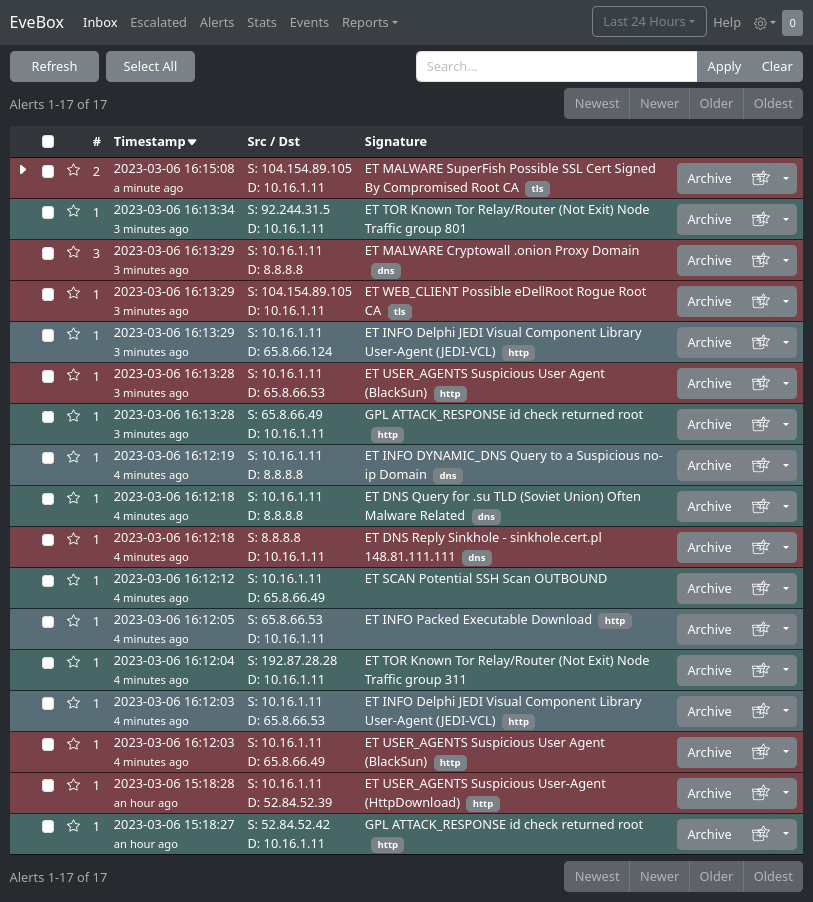
The EveBox inbox. Real events, severity at a glance, and a clear triage workflow.
Archive, escalate, and comment for the next analyst. Auto-archive recurring alerts by SID, optionally matching a sensor, address pair, exact DNS name, or TLS SNI. Alert history shows why each automatic archive happened.
Explore DNS query volume, failed lookups, and top clients. The Anomalies dashboard breaks down Suricata parser and decoder events by protocol, type, and affected hosts. Filter by sensor and time range.
Run evebox oneshot --pcap to process local captures and open the event viewer. Use Podman or Docker on Linux, or a locally installed Suricata on Linux and Windows. Windows supports analysis and import; packet extraction requires Linux.
Configure a local server or remote EveBox Agent capture spool, then download packets matching an event flow, a time window, or a custom BPF filter. Route requests to the capture source for each sensor.
Run the embedded SQLite store for a self-contained installation, or connect to Elasticsearch or OpenSearch for a larger deployment. Keep your existing Filebeat or Logstash pipeline when it already supplies your events.
The server and web UI ship together. Read EVE JSON files and timestamped Suricata spools, or send events with the EveBox Agent. On Unix, configured stream or datagram sockets accept EVE output without an intermediate log file.
02EveBox Rules
Free hosted service · no account required to browse
Control what fires
Know what changed before updating your detections. Search Suricata rules, browse their source files, and compare full before/after rule text. Observed history stays accessible even after a rule is removed.
alert http $HOME_NET any -> $EXTERNAL_NET any ( msg:"EXAMPLE Suspicious HTTP Request"; content:"/old-path"; http_uri; sid:9000001; rev:1;)alert http $HOME_NET any -> $EXTERNAL_NET any ( msg:"EXAMPLE Suspicious HTTP Request"; content:"/new-path"; http_uri; reference:cve,2099-0001; sid:9000001; rev:2;)An illustrative ruleset update, with complete before and after rule text.
Open a ruleset update to see added, modified, removed, enabled, disabled, and moved rules, with generated or feed-derived changes summarized separately.
Expand a modified entry to compare complete before/after rule text, revision changes, filename moves, and links to the rule detail and version history.
Each observed rule version is kept as current, superseded, or removed. Removed rules retain working detail and history pages when you're investigating an older alert.
Emerging Threats, abuse.ch, PawPatRules and more from one place. Search by SID, message and CVE, with per-rule detail pages, a sources catalog, and CVE browsing. Press / to jump to search.
Open a ruleset by original filename, page through its rules, and expand parsed details in place. Signed-in operators can switch to a reconstructed file view, and multi-feed sources expose each variant.
Star rules for a personal working set; sign in with GitHub to keep them with your account. Access grants expose private rulesets only to the accounts they are shared with.
The workflow
Suricata inspects your traffic and produces EVE JSON. EveBox Rules helps you understand its detections; EveBox helps you investigate their results.
EveBox Rules
Search rules, read their history, and review what changed before you update your detections.
the engine
Suricata inspects traffic with your rules and emits EVE JSON events and alerts. It is a separate open-source project.
EveBox
Triage the inbox, search events, and retrieve available packet evidence. Keep a record for the next analyst.
back to Rules
Return to the rule behind an alert. Use that context in your next ruleset decision, then finish triage.
Make it part of your workflow
Run EveBox beside your events. Open EveBox Rules in your browser.
Self-hosted alert manager — point it at your events and open :5636.
Quick start · embedded SQLite
evebox server --datastore sqlite \
--input /var/log/suricata/eve.jsonPCAP review · Linux containers or local Suricata
evebox oneshot --pcap capture.pcapPCAP review · installed Suricata on Linux / Windows
evebox oneshot --suricata-backend local --pcap capture.pcapDocker · with existing Elasticsearch
docker run -it -p 5636:5636 \
  jasonish/evebox:latest \
-e http://elasticsearch:9200Nothing to install — it's a free, hosted web service.
FAQ
Yes. Run evebox oneshot --pcap capture.pcap. On Linux, EveBox can run Suricata through Podman or Docker, or use a local installation. Windows uses a locally installed Suricata. EveBox imports the generated events and opens the viewer. Windows does not support extracting packets from the input capture.
They're one suite, deliberately built as two focused tools. EveBox (at evebox.org) is the alert and event manager you self-host. EveBox Rules (at rules.evebox.org) is the free hosted rule platform. Same author and operating story — different products and deployment models.
Yes. EveBox is open source under the MIT license and free to self-host. The EveBox Rules web app is AGPL v3 and runs as a free public hosted service — open it and go.
No. EveBox includes an embedded SQLite datastore for self-contained, lighter-load installations. For larger deployments, it supports Elasticsearch 7.10 or newer and OpenSearch 2.6 or newer.
From evebox.org: a Docker image (jasonish/evebox), RPM/Deb repositories, raw binaries, or the menu-driven EveCtl. It's also bundled in ClearNDR Community Edition (formerly SELKS).
Suricata is the open-source IDS/IPS/NSM engine that inspects network traffic against detection rules and emits EVE JSON events and alerts. EveBox doesn't replace Suricata — it's the suite for operating the rules it runs and the alerts it produces.